Getting Started5 min readJanuary 31, 2025
Getting Started with Studio Tools
A comprehensive overview of the Icora Studio interface and toolset.
I
Icora Docs
Support
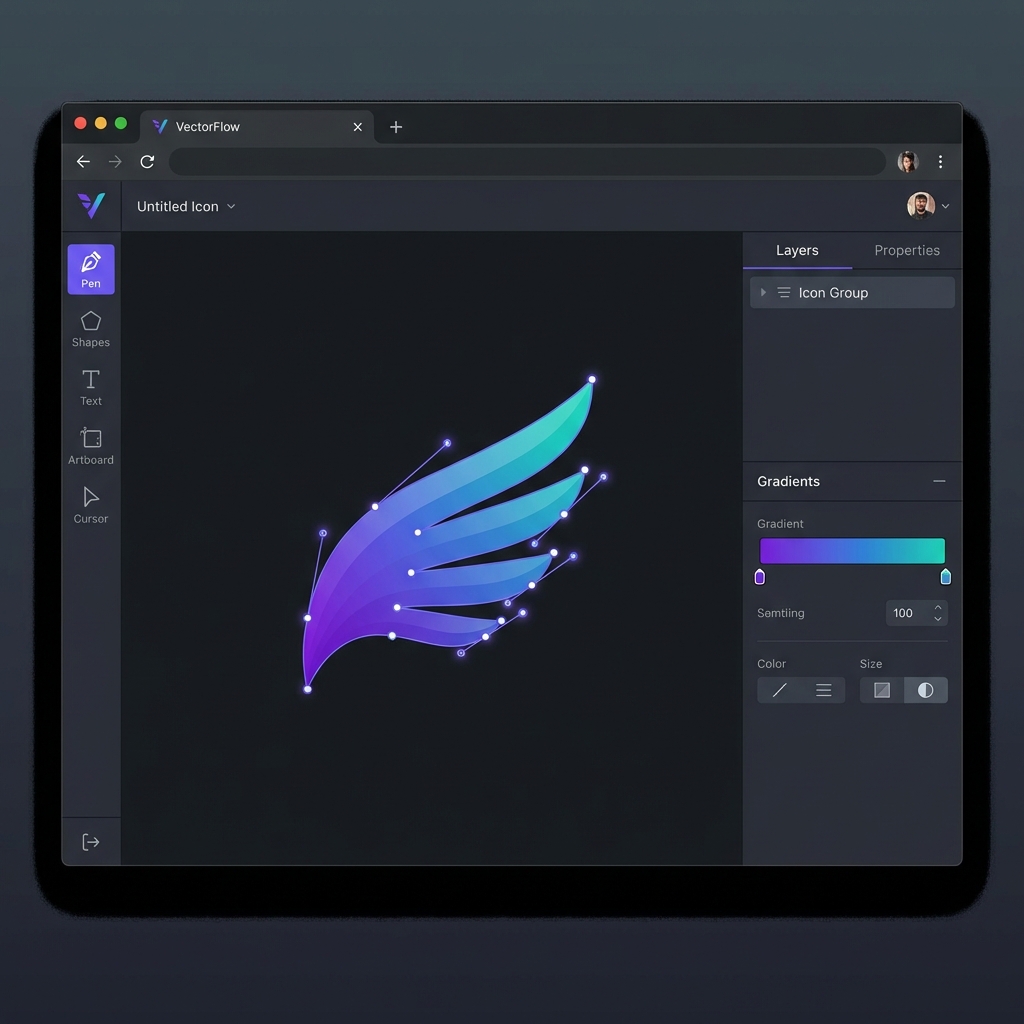
Welcome to the Icora Studio. This specialized vector editor is designed to bridge the gap between AI generation and professional asset delivery.
The Workspace
The workspace is divided into three main areas:
Toolbar (Left)
Contains creation tools: Pen, Pencil, Shapes, and Text.
Layers & Properties (Right)
Manage layer hierarchy, colors, strokes, and export settings.
Canvas (Center)
Your infinite workspace for editing and refining icons.
Key Features
- **Node Edit Mode**: Select any path and press "A" or click the Node tool to edit individual anchor points.
- **Boolean Operations**: Unite, Subtract, or Intersect shapes to create complex geometry.
- **Smart Export**: Automatically optimizes SVGs for production when you export.
Tags:Icora studiovector editorgetting startedtools guide
Found this helpful? Share it!
Ready to Create Stunning Icons?
Put these principles into practice with Icora's AI-powered icon generator, professional studio tools, and developer-ready export.
Start Creating Free